Term frequency: guide
How a text becomes a row of numbers · Week 3 (preview) and Week 4: Cultural Data Forms: Text
Before a computer can compare, search or classify texts, it has to turn them into numbers. The simplest way is to count words: the bag of words. This tool does it for three short documents you can edit, weights the counts with TF-IDF, and measures how similar the documents then look. You can see exactly what survives the counting and what is lost.
1. The screen, part by part
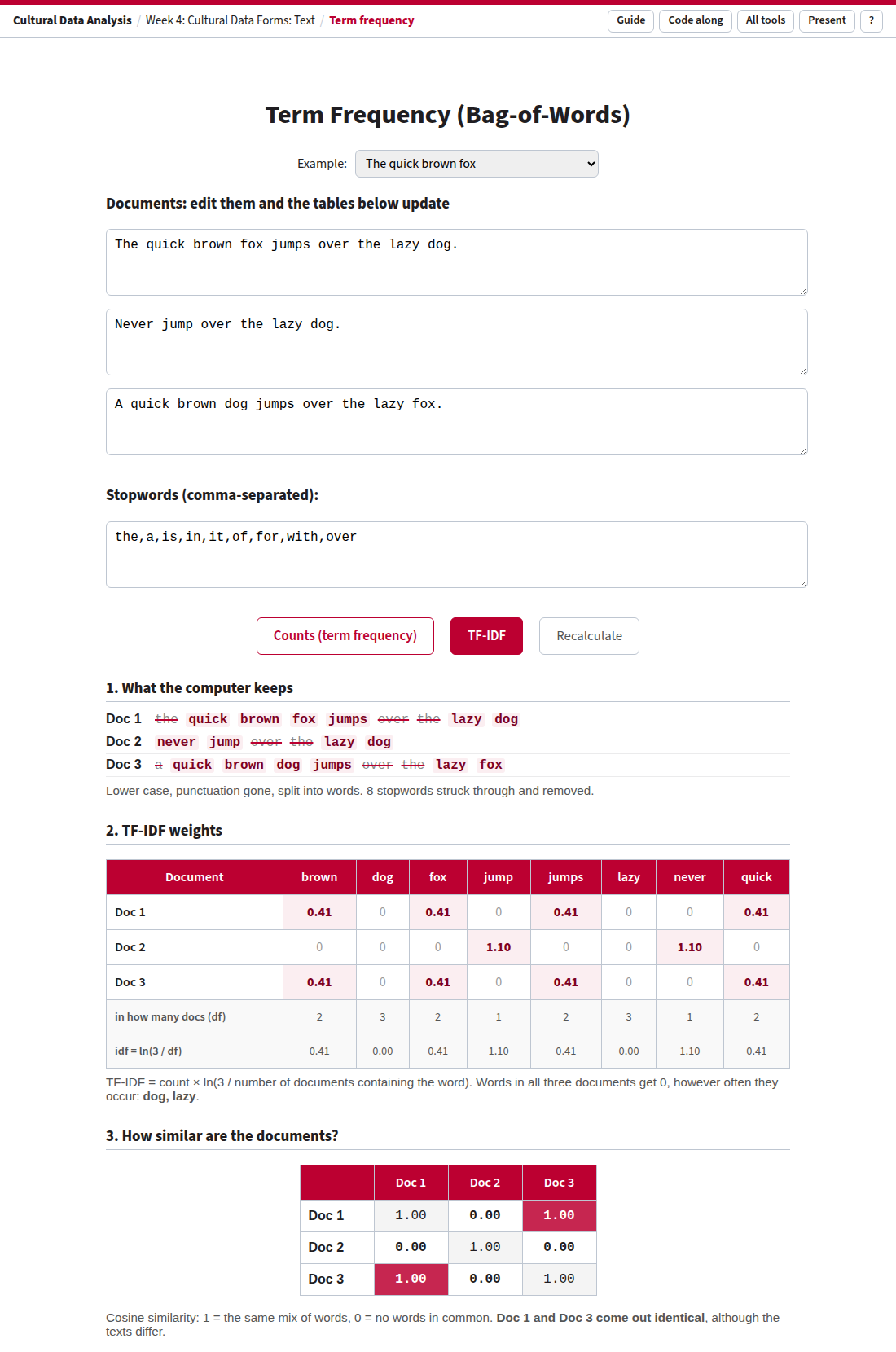
The example documents in TF-IDF mode.
| Part | What it is |
|---|---|
| Example | Three ready-made sets: the quick brown fox, who bites whom, and the house-and-garden documents from the Week 4 code-along. Typing in any box switches to Your own text. |
| Documents | Three boxes of text. Everything below updates as you type. |
| Stopwords | Words to leave out, separated by commas. |
| Counts / TF-IDF | How to weight the words: plain counts, or counts × how rare the word is across the three documents. Space switches. |
| 1. What the computer keeps | Each document as the computer reads it: lower case, no punctuation, one word at a time. Kept words are highlighted; stopwords are |
| 2. The table | One row per document, one column per vocabulary word. In TF-IDF mode two extra rows show in how many documents each word occurs (df) and its weight (idf). |
| 3. Similarity | How alike each pair of rows is (cosine similarity): 1.00 = the same mix of words, 0.00 = nothing in common. Darker = more similar. The sentence below names identical documents, or the most and least similar pair. |
Links that open an example. ?example=bites or ?example=house; your own text with
?d1=…&d2=…&d3=…&stop=…; add &mode=tfidf to open in TF-IDF.
Keys: Space counts/TF-IDF, P presentation mode, ? help, G this guide.
2. What the tool does with your text
- Lower case. “The” and “the” become the same word.
- Split into words. Anything that is not a letter, digit or underscore separates words, so punctuation disappears and “don't” becomes two words, “don” and “t”.
- Remove stopwords. Every word in the stopword list is dropped.
- Build the vocabulary. All remaining words from all three documents, each once, sorted.
- Count. For each document, how often each vocabulary word occurs.
- Weight (TF-IDF mode). count × ln(3 / df), where df is the number of documents that contain the word. This is the
“usual textbook version” from the Week 4 code-along. scikit-learn's
TfidfVectorizeruses a smoothed variant, so its numbers differ slightly. - Compare. Cosine similarity between every pair of rows.
There is no stemming: “jump” and “jumps” are different words. In Python, steps 1–5 are what CountVectorizer does.
3. Walkthrough 1: two different sentences, one vector
Open with the example documents
| brown | dog | fox | jump | jumps | lazy | never | quick | |
|---|---|---|---|---|---|---|---|---|
| Doc 1 The quick brown fox jumps over the lazy dog. | 1 | 1 | 1 | 0 | 1 | 1 | 0 | 1 |
| Doc 2 Never jump over the lazy dog. | 0 | 1 | 0 | 1 | 0 | 1 | 1 | 0 |
| Doc 3 A quick brown dog jumps over the lazy fox. | 1 | 1 | 1 | 0 | 1 | 1 | 0 | 1 |
- Ask the room to compare rows 1 and 3 before you point it out. They are identical, although in one the fox jumps over the dog and in the other the dog jumps over the fox.
- Scroll to the similarity table: Doc 1 and Doc 3 score 1.00; each scores 0.41 with Doc 2.
- Find “jump” and “jumps”: the computer sees two unrelated words.
- “over” is struck through as a stopword. Is it really meaningless here?
4. Walkthrough 2: who bites whom?
| bites | bitten | by | dog | man | was | |
|---|---|---|---|---|---|---|
| Dog bites man. | 1 | 0 | 0 | 1 | 1 | 0 |
| Man bites dog. | 1 | 0 | 0 | 1 | 1 | 0 |
| The man was bitten by the dog. | 0 | 1 | 1 | 1 | 1 | 1 |
The two sentences that mean opposite things get the same vector (similarity 1.00). The two that mean the same thing (“dog bites man” and “the man was bitten by the dog”) share only two words. Counting words keeps what a text is about and loses who does what.
5. Walkthrough 3: stopwords
- With the fox example, empty the stopword box. The struck-through words come back: the vocabulary grows from 8 to 11 words, and “the” counts 2 in Document 1.
- Now add
dogto the stopwords. The one word all three documents share disappears. - Ask: who decides what counts as a stopword? For a corpus of legal texts, would “shall” be one? For poetry, would “the”?
6. Walkthrough 4: TF-IDF
Open the fox example in TF-IDF press Space to switch back and forth
- Look at the two extra rows. “dog” and “lazy” are in all three documents, so df = 3 and idf = ln(3/3) = 0: they vanish, however often they occur.
- “jump” and “never” are only in Doc 2 (df = 1), so they get the highest weight, 1.10.
- Look at the similarity table. Doc 2 was 0.41 similar to the others with counts; with TF-IDF it drops to 0.00, because the words it shared were exactly the common ones.
- Doc 1 and Doc 3 are still identical. Weighting changes how much each word counts, not the fact that word order is gone.
TF-IDF rewards words that are frequent in one document and rare in the others: the words that make a document distinctive. That is why the State of the Union exercise uses TF-IDF to find each speech's top words: words that every speech uses score low.
7. Walkthrough 5: house and garden, as in the code-along
Open with the Week 4 documents
These are the three documents and the stopword list from the Week 4 code-along, so students can check their Python output against the tool.
- With counts, Doc 1 (the beautiful garden) is most like Doc 3 (the green garden): 0.41. Doc 2 (the red roof) is least like Doc 3: 0.17.
- Switch to TF-IDF. “house” is in all three documents and drops to 0, and all three similarities fall to 0.05 or below.
- Ask: all three documents are about a house. Is a weighting that removes “house” a good one here? What changes when there are 230 speeches instead of 3 documents?
8. Questions for class
- What does a bag of words keep, and what does it throw away? Name one research question for which that is fine, and one for which it is not.
- The State of the Union corpus in the code-along has thousands of different words. How many columns would its table have? How many of the cells would be 0?
- Why might a historian not want to remove stopwords?
- “Dog” and “canine” never count as similar here. What would a representation need to know to see that they are? (Try the embeddings demonstration.)
Used in the Week 3 and Week 4 lectures. Source: tools/text.